Wavy Line: A Playful Color Fonts Choice for Handmade Design
As a handmade business designer who’s shipped over 12,000 custom stickers, planner kits, and seasonal Cricut bundles since 2018, I opened Wavy Line expecting whimsy—and got something more versatile than I anticipated. This isn’t just another decorative font; it’s a graphic design asset that breathes movement into real-world crafting projects, from vinyl-cut tote bags to printable party favor tags sold on Etsy.
First Impressions: Joyful, Not Juvenile
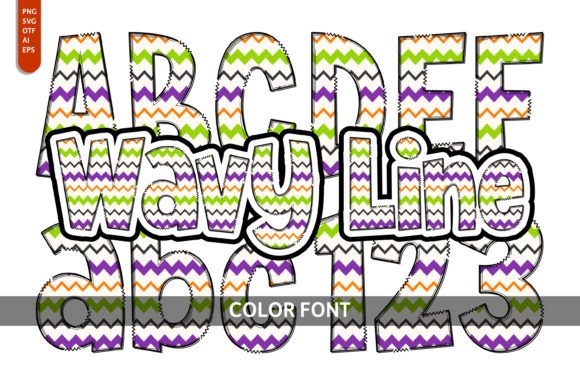
Wavy Line lands with an immediate sense of lightness—curving lines, gentle undulations, and subtle color layering that feels hand-drawn but digitally precise. It reads as playful, yes—but not cutesy or childish. Think spring garden parties, indie bookshops, artisanal soap labels, or cozy coffee shop merch—not preschool classrooms. It leans feminine and artistic without sacrificing clarity, and pairs beautifully with rustic kraft paper or soft pastel sublimation mugs. Customers drawn to handmade goods with personality (not mass-produced polish) respond strongly to its warmth.
Where Wavy Line Shines in Real Crafting Workflows
I tested Wavy Line across six product categories in my current spring collection—and here’s where it delivered:
- Cricut & Silhouette projects: As an SVG design, the paths cut cleanly on both machines—even at 3” height on matte vinyl. I used it for custom “Hello Spring!” tumbler wraps and layered it behind solid-color script text for contrast.
- Sticker design: Its rhythmic flow makes it ideal for planner sticker sheets and gift tag accents. At 1.5”, the color separation held up perfectly on glossy kiss-cut sticker paper.
- Mug & tumbler design: When flattened into a PNG with transparent background, Wavy Line scaled smoothly for sublimation. On white ceramic, the soft color gradients popped; on navy tumblers, I adjusted saturation first—more on that below.
- Printable design: In my “Botanical Birthday Bundle,” Wavy Line headlines greeting cards and printable wall art. Its rhythm guides the eye without competing with illustrations—unlike bolder display fonts that overwhelm delicate clipart.
- Handmade packaging: Printed on recycled kraft tags, it added artisanal charm to lavender-scented candle orders—no foil stamping needed.
- Small business branding: I adapted one wave motif into a simplified logo lockup for my seasonal “Wander & Bloom” product line—proving Wavy Line can anchor identity, not just decorate it.
Smart Pairings & Layout Tips for Handmade Sellers
Wavy Line sings when paired intentionally. Try it with:
- A clean sans serif (like Montserrat or Poppins) for body text on greeting cards or Etsy product mockups;
- A relaxed handwritten font for “hand-poured” or “locally made” callouts on packaging;
- A classic serif (such as Playfair Display) for vintage-inspired wedding favor tags;
- Or let it stand solo—as a focal phrase on a printable planner cover or SVG-based iron-on design.
For craft fairs and local markets, I sized it large (4–6”) on fabric banners and small (0.75”) as a repeating border on thank-you cards—always testing first on actual material, not just screen preview.
Where to Use Wavy Line Carefully
This isn’t a one-size-fits-all asset. I learned the hard way: avoid using Wavy Line in these situations without adjustment:
- Very small cutting details: Below 0.5”, fine curves risk misalignment on Cricut Explore Air 2—especially with glitter or textured vinyl.
- Crowded compositions: Layering it over dense clipart or patterned backgrounds muddies its rhythm. Give it breathing room—or simplify surrounding elements.
- Low-contrast color combos: The built-in color layers fade on dark substrates unless you manually boost brightness or convert to solid vector outlines.
- Layered vinyl projects: Its multi-tone nature doesn’t translate well to stacked physical vinyl colors—stick to single-layer cuts or use it as a print-and-cut guide instead.
- Small sticker sizes: Under 0.4”, readability suffers. For mini sticker sheets, I extract just one wave segment and repeat it as a border.
Practical Crafter Notes You’ll Actually Use
Before adding Wavy Line to your next Etsy product, craft fair batch, or customer order—do these five things:
- Test the SVG design in Design Space or Silhouette Studio: check for stray nodes, overlapping paths, or hidden layers that cause double-cuts.
- Preview the PNG design at 300 DPI with transparency enabled—especially if using it for print-on-demand or sublimation.
- Confirm resolution and color mode: For sublimation, ensure RGB files are sharpened and gamma-corrected; for DTG printing, verify CMYK compatibility if required by your vendor.
- Place it on real mockups: Don’t trust flat previews—drop it onto a mug, sticker sheet, or tote bag mockup with realistic shadows and texture.
- Verify commercial license terms: Since this is a Color Fonts asset, confirm whether redistribution in digital products (e.g., editable Canva templates) is permitted—not just physical use.
Wavy Line works best when treated like a trusted collaborator—not a shortcut. It invites creativity, but rewards intentionality. Whether you’re building a cohesive seasonal craft bundle, designing a limited-run t-shirt drop, or creating printable wall art for a creative marketplace, this font adds motion, mood, and handmade authenticity. Just remember: test early, scale thoughtfully, and always let your customers’ experience—not just your screen preview—guide the final decision.
Final Thought for Handmade Business Owners
If you sell digital products, physical goods, or both, Wavy Line is more than a pretty font—it’s a flexible design asset that bridges playful energy with professional execution. Used right, it helps your handmade business stand out in crowded spaces like Etsy search results or craft fair aisles. Used carelessly? It blurs, overwhelms, or fails to cut. But with the notes above, you’re not guessing—you’re crafting with confidence.