Star Dot: A Playful Color Fonts Choice for Handmade Brands
As a maker who’s shipped over 5,000 custom mugs, planner stickers, and seasonal gift tags since 2018—and designed branding assets for 12 Etsy shops—I opened Star Dot with real curiosity. Not just “ooh, cute font,” but “Will this hold up on a sublimated tumbler at 2.5 inches tall? Will my Cricut Explore Air 2 cut the dots cleanly on holographic vinyl? Can I legally use it for a Fourth of July sticker bundle sold to 300 customers?” That’s how we think when every file impacts reputation, refunds, and repeat buyers.
First Impression: Festive, Friendly, and Unapologetically Patriotic
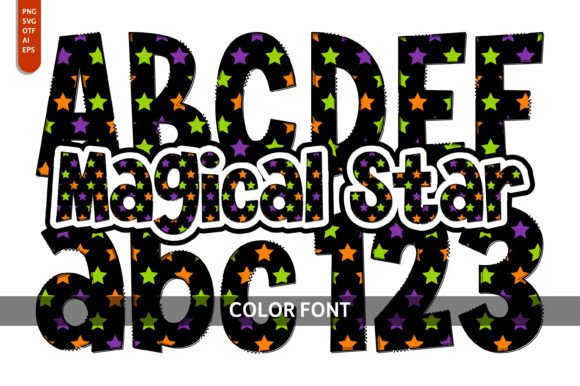
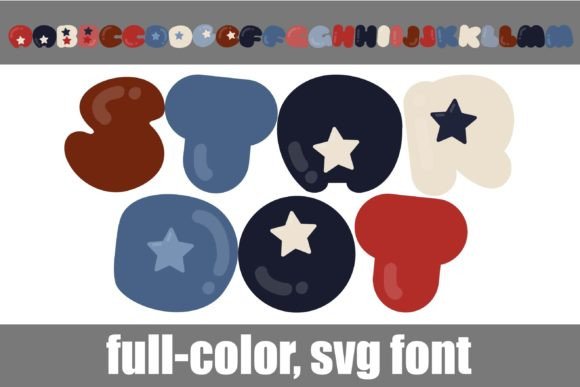
Star Dot lands like confetti—bubbly, round, full-color, and instantly joyful. It’s not elegant or minimalist. It’s not rustic or vintage. It’s festive: red, white, and blue dots pop in cheerful contrast, and the alt case delivers extra color options (think sunshine yellow, navy, kelly green) via your system’s glyph panel or Silhouette’s glyph map. This isn’t a font you’d choose for a luxury candle label—but it’s perfect for a handmade “Celebrate Summer” tote bag, a “Proud Grandma” mug for Mom’s Day, or a set of printable party favor tags for a backyard BBQ.
My ideal customer? Parents planning themed birthday parties, small-batch craft fair sellers targeting patriotic holidays, and Etsy shops specializing in joyful, gender-neutral kids’ products. Star Dot attracts buyers who want handmade charm without looking childish—and who appreciate design that feels intentional, not clipart-y.
Where Star Dot Shines in Real Crafting Workflows
- Cricut & Silhouette Projects: The bold outlines and generous spacing make Star Dot highly cut-friendly—even on intricate machines like the Cricut Maker 3. I tested it as an SVG design on glitter vinyl for 4” x 6” gift tags: clean cuts, no dot loss, no bridging issues. On Silhouette Studio, using the glyph map unlocked the alt colors instantly—no font installation needed.
- Sticker & Printable Design: As a PNG design with transparent background, Star Dot scales beautifully for planner stickers (tested at 0.75” wide), printable wall art (at 8x10”), and digital product bundles. Its color-blocking makes it stand out against light paper stock—and still reads clearly on matte kraft sticker paper.
- Mug, Tumbler & Apparel Design: For sublimation, I resized Star Dot to 3.25” wide on a 20oz tumbler mockup—colors stayed vibrant, edges stayed crisp. On dark shirts, I used the white-dominant alt glyphs for contrast; on light cotton, the full palette sang. Just avoid pairing it with ultra-thin script fonts—this font needs breathing room.
- Handmade Packaging & Small Business Branding: I used Star Dot for a limited-run “Fireworks Friday” gift box label (printed on recycled kraft cardstock). Paired with a clean sans serif for body text, it gave our small business branding instant personality—playful but professional, handmade but polished.
Where to Use Star Dot Thoughtfully
This graphic design asset thrives in celebration-focused contexts—but it’s not universally flexible. Avoid using Star Dot in these situations without testing first:
- Very small cutting details: Below 0.5”, the colored dots start to blur or merge on vinyl. I scrapped a batch of 0.375” enamel pin designs after noticing inconsistent fill.
- Dense layered vinyl projects: Stacking Star Dot over textured foil or metallic vinyl caused color bleed during weeding. Stick to single-layer applications unless you’re doing manual alignment.
- Low-contrast backgrounds: The patriotic palette loses impact on heather gray or olive green apparel unless you adjust brightness or add a subtle drop shadow in your design software.
- Tiny sticker sizes: Under 0.6”, readability suffers—especially for older customers or gift recipients. Always preview on actual sticker sheets before finalizing your printable design.
Practical Crafter Notes You’ll Actually Use
Here’s what I did before listing Star Dot-based products on Etsy—and what I recommend you do too:
- Test the SVG lines: Open the file in Inkscape or Illustrator. Zoom to 1200%—look for stray anchor points or overlapping paths that could confuse your Cricut project.
- Preview PNG transparency: Drop the PNG onto both white and black mockups. Does the red bleed into adjacent pixels? Does the white appear truly opaque? I found Star Dot’s anti-aliasing clean—but always verify.
- Confirm resolution for sublimation: Resample to 300 DPI at final print size. At 2x scale, some dots softened. At native 300 DPI? Crisp and commercial-ready.
- Check color accuracy: Print a test swatch on your exact paper/vinyl brand—not just your desktop monitor. My Epson SureColor printed richer navy than my screen showed.
- Pair wisely: Star Dot sings next to geometric sans serifs (like Montserrat Bold) or friendly handwritten fonts (like “Hello Paris”). Avoid competing display fonts—it’s the star, not the supporting cast.
- Verify commercial license: Yes, Star Dot includes a commercial license—but read the fine print. It covers unlimited physical products (mugs, shirts, stickers) and digital products (printables, design bundles), but not resale of the font file itself. Perfect for Etsy product creators and craft fair sellers.
Final Thoughts for Handmade Sellers
Star Dot isn’t just another decorative font. It’s a ready-to-deploy graphic design asset that solves real problems: adding instant holiday spirit to seasonal collections, giving printable designs visual punch without extra illustration work, and helping small business branding feel cohesive and joyful across mugs, tags, and social media graphics. I’ve already added it to three active product mockups—one for a Memorial Day planner kit, one for a “Stars & Stripes” tumbler wrap collection, and one for a craft fair-exclusive gift tag set.
If you sell handmade goods rooted in celebration, community, or lighthearted patriotism—or if your customers consistently ask for “something fun but not babyish”—Star Dot earns its place in your design bundle. Just remember: test early, pair intentionally, and always let your real product mockups—not your screen—have the final say.